
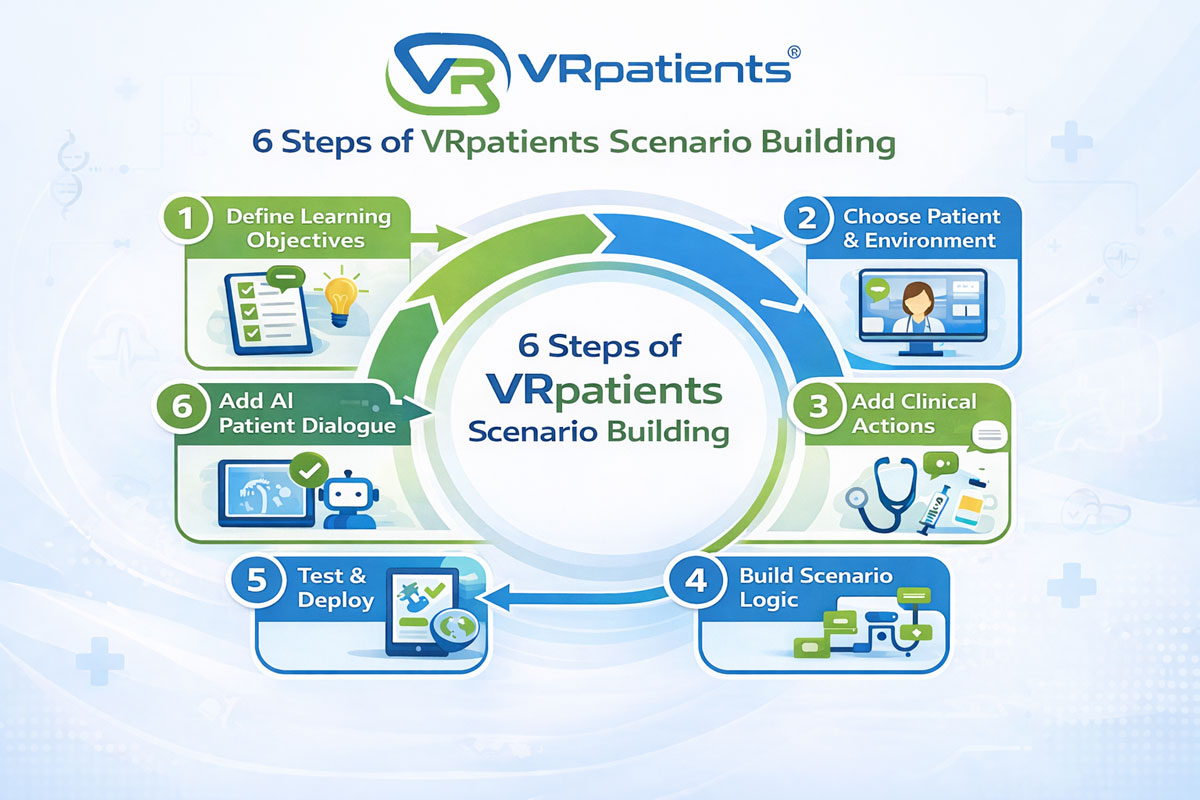
Scenario Building in 6 Steps: A Practical Guide for Healthcare Educators
One of the biggest challenges in healthcare education isn’t explaining clinical concepts—it’s giving learners enough meaningful practice before they encounter real patients. Traditional simulation labs help, but they are often limited by space, staffing, scheduling, and equipment availability. As a result, many educators are searching for ways to expand simulation opportunities without expanding infrastructure.
That’s where virtual patient simulation platforms like VRpatients are changing how healthcare training can be delivered. Instead of relying solely on physical simulation labs, educators can design immersive patient encounters that in a web browser or inside a fully immersive virtual reality headset. These simulations allow learners to practice assessment, communication, and treatment decisions in a safe environment where mistakes become learning opportunities rather than clinical risks.
The VRpatients platform gives nursing, EMS, and interdisciplinary educators the ability to create these experiences themselves. Using a no-code scenario builder, instructors can design patient encounters that mirror real clinical decision making—from adjusting vital signs to creating branching treatment pathways that respond to learner actions.
Before we explore how to build scenarios step by step, let’s first understand the broader VRpatients ecosystem and how the platform is structured for educators.
Understanding the VRpatients Ecosystem
VRpatients’ authoring tool allows educators to design virtual patient simulations using a visual, no-code interface. Instead of relying on programmers or outside developers, instructors can build scenarios themselves using drag-and-drop tools and straightforward logic pathways.
Educators can control nearly every part of the simulation experience. Patient avatars, environments, symptoms, clinical interventions, monitoring equipment, and moulage can all be customized within the scenario builder. This flexibility allows instructors to design simulations that reflect real clinical workflows in settings such as emergency care, mental health encounters, acute care nursing, or pre-hospital EMS.
The platform also includes dozens of editable scenario templates that cover common high-risk clinical conditions like stroke, sepsis, allergic reactions, overdose, and abdominal pain. These templates can be duplicated and modified, allowing instructors to quickly create new scenarios while still tailoring them to their own protocols and learning objectives.
How VRpatients Scenario Building Works
Designing a simulation in VRpatients follows a process that mirrors how educators already approach clinical training. Rather than focusing on complicated software tools, the platform centers on the educational goals behind each scenario.
Step 1: Start with the Learning Objective
Every effective simulation begins with a clear purpose. Educators typically start by identifying the competencies they want learners to demonstrate during the scenario.
Some simulations focus on patient assessment and early recognition of symptoms. Others emphasize communication skills, protocol adherence, or complex decision-making under pressure. By defining these goals first, instructors ensure the simulation reinforces the behaviors and clinical reasoning students need to practice.
Step 2: Choose the Patient and Clinical Environment
Once the objective is clear, the next step is choosing where your scenario will take place and choosing your patient. VRpatients allows instructors to choose from a wide range of environments, from a home or a back alley, to an ambulance or Emergency Room, and over eight culturally diverse patient avatars.
Educators then configure the patient’s presenting condition by defining symptoms, vital signs, and the complaint. This establishes the starting point for the simulation and gives learners the information they would typically encounter when first assessing a patient.
Step 3: Add Clinical Assessments and Interventions
After the patient presentation is established, instructors begin defining what learners can actually do during the simulation.
This includes adding clinical assessments, medication administration options, oxygen therapy, IV therapy, and other medical procedures. Monitoring equipment and diagnostic media such as ECGs or lab results can also be incorporated.
At this stage, the clinical workflow begins to take shape, giving learners a realistic set of decisions and actions to navigate as the case unfolds.
Step 4: Build Scenario Logic and Patient Progression
One of the most powerful features of VRpatients is the logic system that controls how the patient responds to learner decisions.
Using visual logic tools, educators can create branching pathways that change the patient’s condition as the scenario progresses. Correct treatments may stabilize the patient, while delays or incorrect decisions may cause symptoms to worsen.
This dynamic cause-and-effect progression helps learners see how their clinical decisions directly influence patient outcomes.
Step 5: Add AI-Driven Patient Communication (Optional)
Clinical care involves more than technical skills. Communication and bedside interaction play a critical role in patient outcomes.
VRpatients has made this easier by providing AI-powered patient dialogue, allowing virtual patients to respond naturally to learner questions and interactions. Educators can shape how the patient communicates by defining personality, tone, emotional responses, and the types of clinical information the patient reveals during the encounter.
This capability makes it possible to simulate complex conversations, including mental health assessments, motivational interviewing, and other patient-centered communication scenarios.
Step 6: Test and Refine the Scenario
Once the scenario is built, educators typically run test sessions to evaluate how the simulation performs.
Testing allows instructors to refine pacing, adjust patient responses, and confirm that the logic pathways produce the intended learning outcomes. Because VRpatients scenarios can be edited instantly, educators can continue improving simulations as their curriculum evolves or new clinical guidelines emerge.
Support at Your Fingertips
Although the platform is designed to be intuitive, VRpatients also provides several resources to help educators learn the system quickly.
VRpatients University offers structured training modules that guide instructors through scenario creation, scenario logic, and AI dialogue features. These courses help new users move from beginner to advanced scenario designer.
Educators can also start with built-in templates and modify them to fit their curriculum. This approach allows instructors to launch simulations quickly while still customizing them for their teaching needs.
Additional support is available through the VRpatients Help Center and onboarding services, helping institutions learn best practices and troubleshoot issues as they begin creating new simulations.
If you’re interested in exploring ways to expand simulation training for your student learners, click here to complete a short form and schedule a customized demo with one of our VRpatients-trained experts. We can’t wait to show you the future of clinical simulation training!